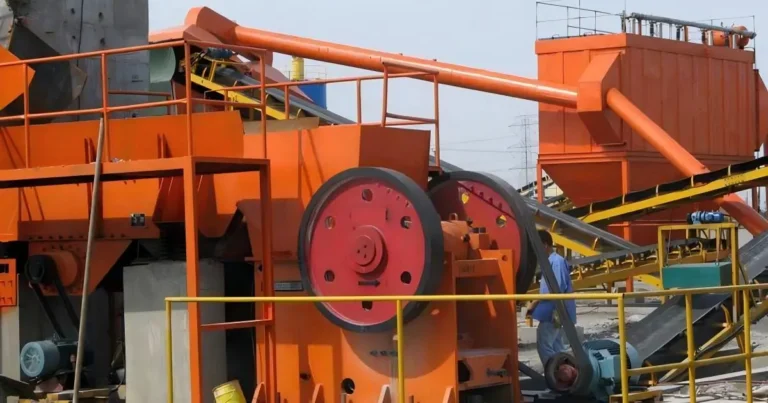

A vibrating screen bearing rarely fails for just one reason. Lubrication, contamination, mounting, operating conditions and problems elsewhere in the screen can all play a part. If the bearing is replaced without checking the surrounding assembly, the same failure may happen again.
This guide covers the warning signs to watch for, what to inspect when a bearing is removed, and which operating details to record. For an overview of TEDIN’s vibrating screen bearing applications, see the application page. Always follow the equipment and bearing manufacturers’ instructions for the specific machine.
Signs of Bearing Trouble
Pay attention to changes from the screen’s normal operating condition. A single reading is less useful without context, so compare temperature and vibration data with the machine’s history and the manufacturer’s limits.
- Temperature keeps rising: Check the lubrication, bearing fit and operating conditions. Do not judge temperature by touch alone.
- Noise changes: Grinding, knocking or a new rumble warrants inspection, especially if it changes with speed or load.
- Vibration increases: Find out whether the change is local to the bearing or present across the screen, drive or support structure.
- Lubricant leaks or looks different: Leakage, discoloration or visible contamination may point to a seal or lubrication problem.
- A replacement fails early: Review the whole bearing position and operating history before fitting another one.
If readings exceed the machine’s specified limits, follow your site’s stop-and-inspect procedure. Do not keep running the screen in the hope that the condition will improve.
What to Check Before Blaming the Bearing
Lubrication
Too little lubricant can leave the bearing inadequately protected. Too much can also cause trouble; in some arrangements, excess grease creates heat through churning. The right lubricant, quantity and service interval depend on the bearing and screen design, so use the manufacturer’s guidance rather than a generic schedule.
Check that lubricant can reach the bearing. Look for blocked lines, damaged fittings, leaking seals or hardened, contaminated grease. Record what lubricant was used and when it was applied.
Dust, moisture and contamination
Fine particles, water and process material can reach the bearing if seals or housing interfaces are damaged. Inspect these areas during maintenance, and consider whether washdown or cleaning practices could be pushing water or debris toward the bearing.
Vibrating screens operate under continuous vibration, often in dusty or contaminated conditions. These factors make bearing selection, sealing and lubrication important parts of the maintenance plan. TEDIN’s mining and construction bearing solutions page outlines the demanding conditions found across these applications.
Mounting, fit and clearance
Incorrect mounting can damage a bearing before the screen returns to service. Inspect the shaft seat, housing bore, shoulders and locating surfaces for wear, burrs, fretting or impact marks. If a surface looks damaged, measure it against the machine specifications before installing a replacement.
Confirm the required bearing designation, fit and internal clearance for the exact position. Do not assume that C3 or C4 clearance is appropriate simply because it is used on another screen. The correct specification depends on the bearing arrangement, fits and machine design.
Drive, supports and screen structure
The bearing may be responding to a problem elsewhere in the machine. Check the drive components, support springs, fasteners and structure for looseness, wear or damage. Note any recent changes to screen speed, feed distribution or loading.
If vibration has increased across the screen rather than around one bearing, investigate the drive and support system as well. Replacing the bearing alone may not address the source.
Inspecting the Assembly After Removal
Before cleaning or discarding the old bearing, photograph its condition and note where any visible marks appear. Look for discoloration, wear, corrosion, surface damage and contamination. These observations can help with the investigation, but should be considered alongside operating records and the condition of the complete assembly.
- Record the operating context. Note when the symptoms started, the machine’s speed and load, recent maintenance, lubrication history and any changes in operation.
- Inspect the bearing and lubricant. Record what you see before cleaning the parts.
- Check the shaft and housing. Inspect the fit and locating surfaces; measure them against the machine specifications if wear or damage is suspected.
- Inspect seals and lubrication paths. Look for leaks, damage, blockages or signs that lubricant has not reached the bearing.
- Verify the replacement bearing. Match the complete designation and configuration to the approved parts information for the machine.
- Check nearby components. Inspect the drive, supports, fasteners and screen structure for conditions that may have contributed to abnormal loading or vibration.
Keep the replacement bearing clean until installation. Use the specified mounting method and apply force only where the manufacturer directs. If the procedure requires heating, use an approved controlled method and stay within the specified limits. Never use an open flame.
Symptoms and Useful Checks
| Symptom | Checks to make |
|---|---|
| Temperature rises after start-up | Check lubricant type and quantity, bearing fit, installation condition and the machine’s specified limits. |
| Grease looks dirty or discolored | Inspect seals, housing interfaces, lubrication equipment and maintenance practices for contamination. |
| Noise or vibration increases | Compare readings with the machine’s history, then inspect the bearing area, drive, supports and structure. |
| A replacement bearing fails early | Review the old bearing, shaft and housing condition, lubrication records, installation method and operating conditions. |
These checks can help narrow down the investigation, but they are not a diagnosis. Confirm findings against monitoring data and the manufacturer’s service limits.
Choosing a Replacement Bearing
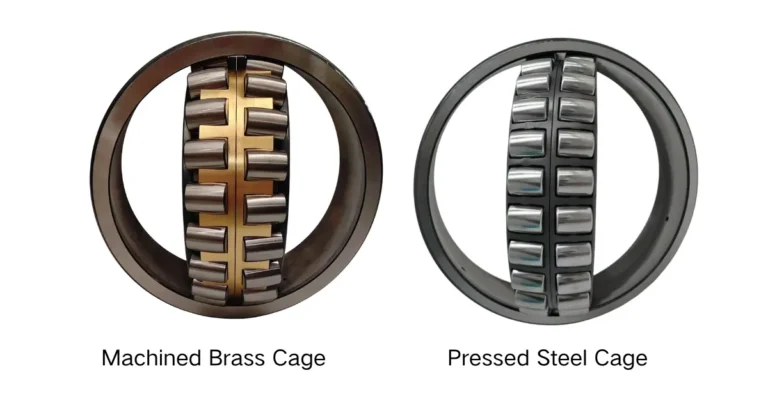
Some vibrating screen arrangements use spherical roller bearings. Their suitability depends on the screen design, bearing position, loads, fits and operating conditions. Confirm the required type and specification before ordering; do not select a replacement based on appearance alone.
When reviewing an application, useful details include the screen model, bearing position, existing bearing designation, shaft and housing dimensions, operating speed, lubrication method and service conditions. These details help distinguish a parts-identification question from a wider operating or installation issue.
After Replacement
Before restarting the screen, complete the checks required by the equipment manufacturer. Confirm that the bearing is seated as specified, the lubrication route is clear, seals are correctly installed and all removed components are back in place.
During start-up, follow the site’s commissioning procedure. Monitor temperature, noise and vibration under the specified conditions, and record the results. If the screen behaves abnormally or a reading is outside the allowable range, follow the site’s stop-and-inspect procedure.
If the same bearing position fails again, compare the new evidence with the previous inspection. Review the fit, lubrication, sealing, mounting and machine operating conditions together instead of treating the replacement bearing as the only suspect.
If you need help reviewing a bearing application, contact TEDIN’s bearing support team with the equipment type, bearing position, existing bearing model and operating conditions.